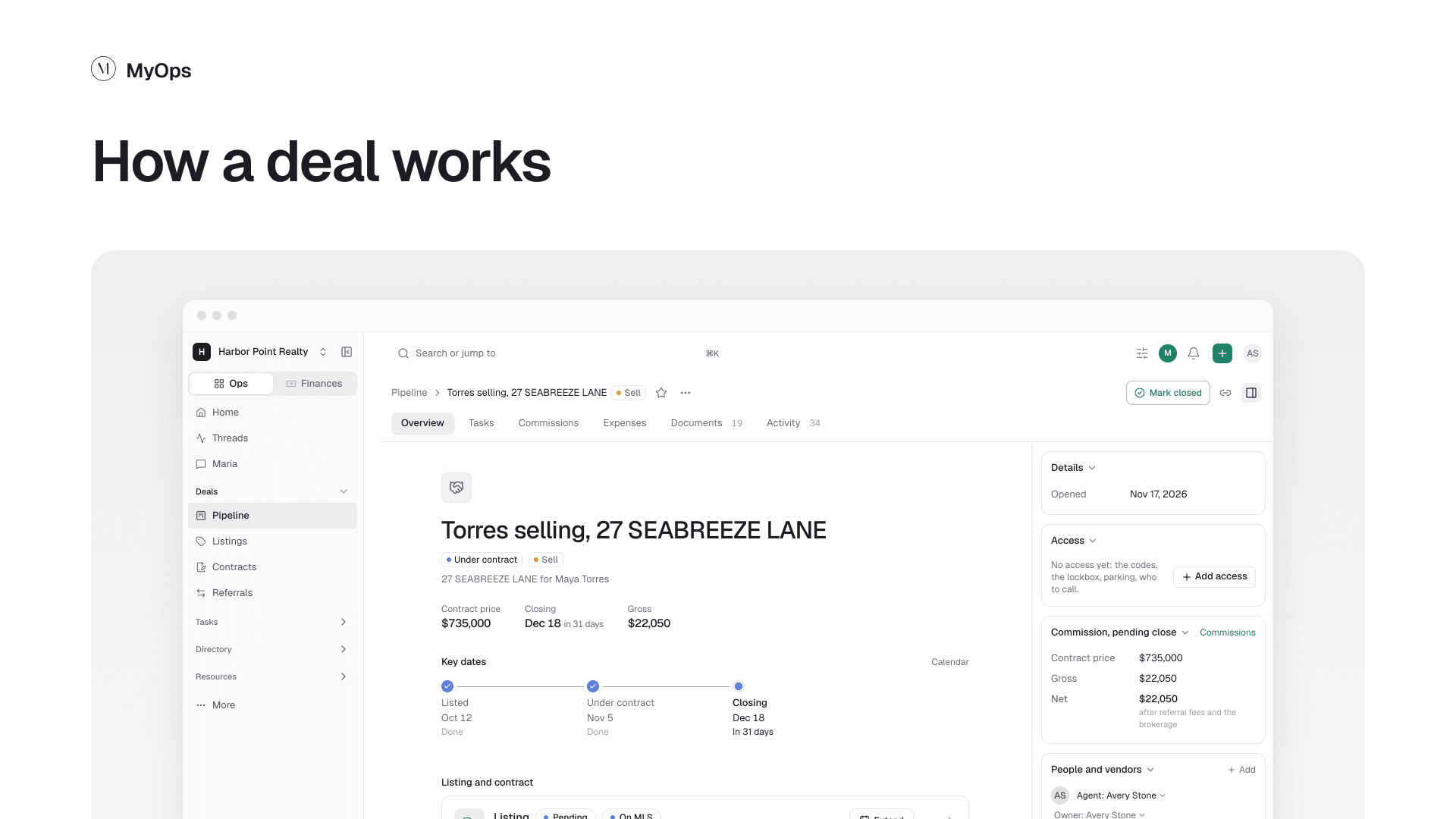
Every buyer, seller, listing and contract is a deal. Open one from the Pipeline and everything about it is on one page.
The page, top to bottom
- The top bar. The deal's next step, like Add a contract or Mark closed, and the ... menu with everything else you can do.
- The tabs. Each one is a part of the deal. See the table below.
- The header. The deal's name, price, closing date and key dates, then the listing and contract cards.
- Details. The stage, who sees the deal, the agent, the owner, the client and the home. Select the stage to move the deal.
- The side panel. The deal's money, its people and vendors, and the latest activity. Hide it with the panel button at the top right.
The tabs
| Tab | What it is for |
|---|---|
| Overview | The whole deal at a glance |
| Tasks | To-dos and checklists for the deal |
| Documents | Every file on the deal, in folders |
| Activity | Notes, calls and what happened |
| Commissions and Expenses | What the deal pays and what it cost |
| Buyer needs | What the buyer is looking for |
Commissions and Expenses show only to people who can see the deal's money. Buyer needs shows once the deal has one.
Who sees a deal
A Private deal: its agents, admins, the owner and people it is shared with. A Workspace deal: everyone in the workspace.